


Google Docs
Product and engineering teams write specs, PRDs, and design docs in Google Docs long before work gets ticketed. The TerraTrue Google Drive integration turns those documents into the trigger — apply a label, and TerraTrue creates the launch, summarizes the doc, and pre-fills intake answers from its contents.
Why we built this integration →
What you can do with TerraTrue x Google Drive
Create a launch automatically from a Google Doc
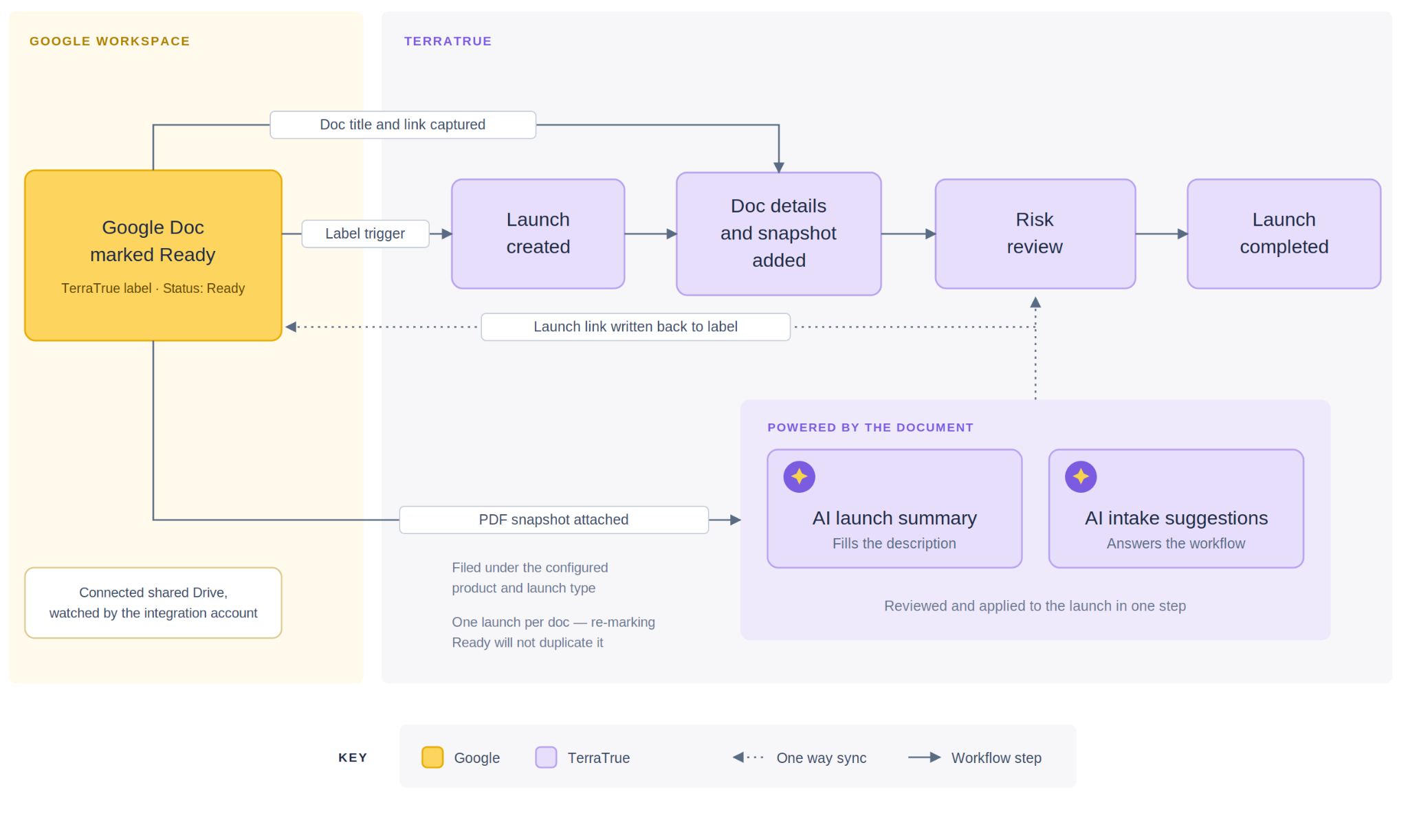
Apply the TerraTrue label to a doc in a connected shared Drive and set its status to Ready. TerraTrue creates a launch and starts the review.
Synchronize core information
The launch inherits the document's title, a link to the doc is added to the launch, and a PDF snapshot is attached for reference.
Auto-generate the launch description with AI
TerraTrue AI summarizes the document and pre-fills the launch description, so reviewers start with context instead of a blank field.
Power AI-suggested intake answers
The document's contents feed inline AI suggestions in your workflows, so nobody is answering questions the spec already covers.
Keep your Google Doc updated
TerraTrue writes the launch link back into the document's TerraTrue label, so anyone working in the doc can jump straight to the review.
Route launches to the right place
Configure which product — and which launch type, if your organization requires one — integration-created launches are filed under.
How it works
1. Set up your Google Workspace Create a dedicated integration account and publish a TerraTrue label with a Status field that includes a Ready option, plus a Link field.
2. Share your shared Drive Place the docs you want reviewed in a shared Drive and share it with the integration account with at least Contributor access.
3. Enable the Google Drive integration in TerraTrue Go to Org Settings → Integrations → Google Drive, connect, and authorize as the integration account. TerraTrue verifies the connection automatically.
4. Configure launch settings Choose the product and launch type for integration-created launches, then complete setup.
Pricing
- Included in Enterprise plan
- Available for Business+ plan as an add-on